Response timing
The Snolarkew team aims to review enquiries in reasonable time, but does not commit to a specific response period. The complexity of the request and the volume of enquiries received both affect the time taken to respond.
A detailed account of the capabilities that underpin the Snolarkew interface — from the initial intake and classification of information to the review workflow and the user-facing access process.
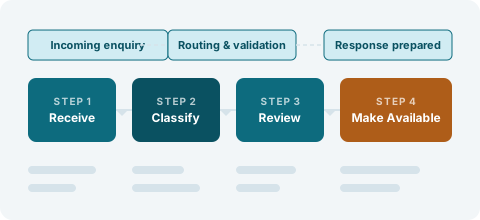
Each function described below corresponds to a distinct stage in how information is handled within Snolarkew. These functions operate in sequence, though users primarily interact with the later stages of the workflow.
When new information enters the Snolarkew system — whether through an enquiry submission, a team-initiated intake, or a supported data transfer — it is first assessed to determine whether it falls within the platform's defined scope. Information that falls outside the scope is not retained within the classification system. The assessment step is not visible to users but is a necessary precondition for the classification step that follows.
Information that passes the preliminary assessment is classified according to the platform's category structure. Each item receives a category label and, where applicable, one or more secondary tags that describe its characteristics in more detail. Classification is performed by the Snolarkew team using internal criteria. The category structure is reviewed periodically and updated when the scope of the platform changes. Users are not directly involved in the classification step, but the category labels they encounter in the interface reflect the outcome of this process.
Classified information becomes available through the review interface. The interface presents records in a structured format: each record displays the fields associated with its category, and the field labels are consistent across all records within a category. Users can navigate between categories using the platform's primary navigation. Within a category, records are displayed in the order determined by the platform's internal sorting criteria. Users can examine individual records but cannot modify them through the interface.
Users who wish to request access to a specific record, submit a correction, or ask a question about the platform can do so through the enquiry form. The form collects the user's name, email address, the type of request, and a message. Once submitted, the enquiry is routed to the appropriate member of the Snolarkew team based on the request type selected. The team reviews the enquiry and responds by email. The team may ask for additional information before providing a response.
The Snolarkew team reviews each access request and determines the appropriate response. Where access can be provided, the team will communicate the method by which the user can view or receive the relevant information. Where access cannot be provided, the team will notify the user and, where possible, suggest an alternative. The team does not guarantee any particular outcome and does not provide access automatically. All access decisions are made at the team's discretion based on the nature of the request and the category of information requested.
The review interface is the part of the platform that users interact with directly. It is designed to present classified information in a consistent, readable format without requiring users to understand the classification process itself.
Navigation within the interface follows the category structure. Each category page lists the records assigned to it, with brief summaries visible before a user opens an individual record. The summary fields are determined by the category and are the same for all records within that category.
The interface does not include real-time data updates, predictive search, or user-configurable filters. What is visible is what has been classified and made available. Users who cannot find the information they are looking for are encouraged to submit an enquiry.
The following steps describe the typical path of an access request from submission to response.
Use the enquiry form on the Enquiry page to describe your request. Select the appropriate request type and provide a clear message.
Your enquiry is received and assigned to the team member responsible for the relevant category or request type.
The team member reviews your request. They may respond with questions, with the requested information, or with an explanation of why access cannot be provided.
The team responds to the email address you provided. All communication about your request takes place through that email thread.
The Snolarkew team aims to review enquiries in reasonable time, but does not commit to a specific response period. The complexity of the request and the volume of enquiries received both affect the time taken to respond.
In some cases, the team may be able to provide access to part of a requested record or category while the remainder requires further review. Partial access is offered where it is practical and appropriate.
The team may contact you to ask for further details before proceeding with your request. Providing complete and accurate information at the enquiry stage helps avoid delays in this process.